

If you are a brand, franchise, or a local brick-and-mortar with multiple locations or are opening your second location, this post is for you.
All too often, and this is often seen even with the biggest of brands, companies aren’t optimizing their local SEO for multiple cities the right way.
To be clear, we are talking about ranking for local search related to your business and the promise of ranking within Google’s map pack.
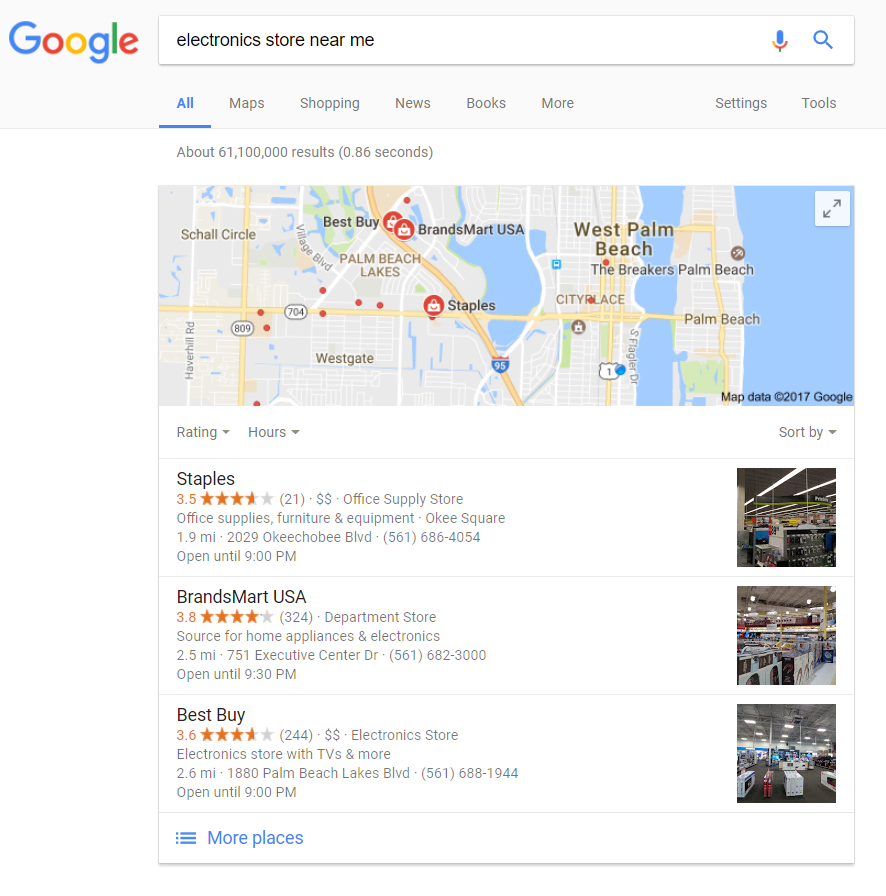
By the end of this post, you’ll know whether or not you are doing multilocation local SEO properly, or what you can do to fix it if you’re not.
The Importance of a Local Business SEO Strategy
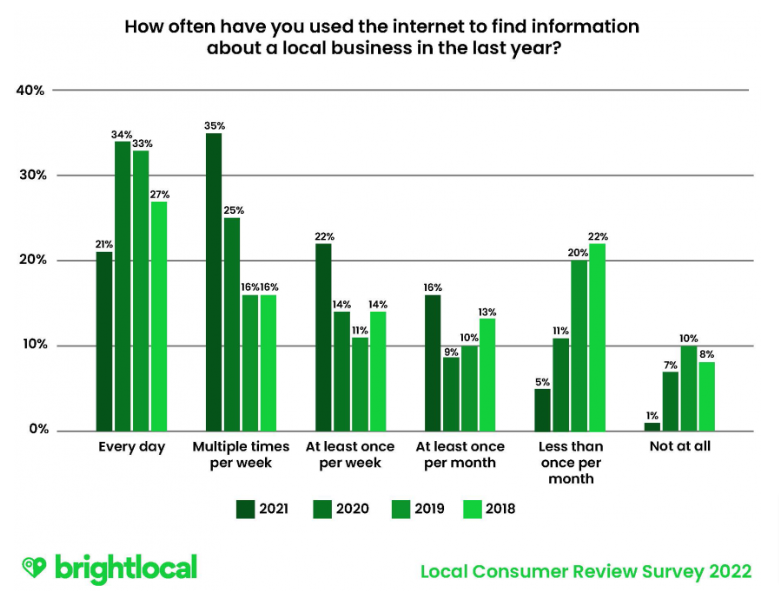
According to a recent survey by our friends over at Brightlocal, 35% of consumers search for local businesses multiple times per week. And, this number is growing, it was 28% in 2020. To look at it another way, only 1% of consumers said they never use the internet to search for local businesses.
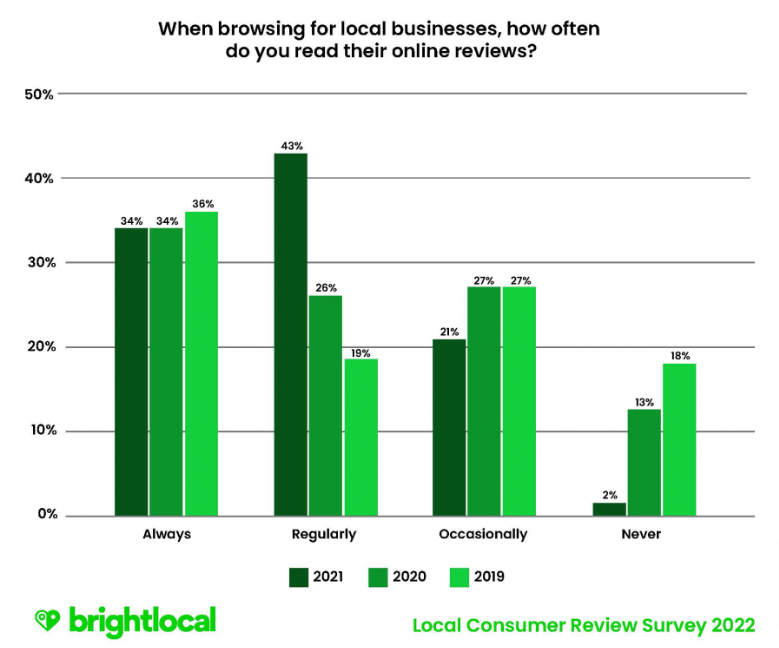
Plus, if the evidence for a review strategy isn’t enough to get all of your local businesses more search engine exposure, check out the data on online reviews that showcases that we trust the third-party opinions of others.
How to do SEO for Multiple Locations
Now that we’ve gotten some fun facts out of the way and you can use them to report to your CEO about why you need a bigger budget to fix all your local business issues, here’s how you can make moves to get to the top of the map pack for searches related to your business in your local area.
Optimized Individual Location Pages
This is perhaps the most erroneous multilocation SEO error. If you have one, centralized page for all of your locations, you need to take it a step further. Each one of your locations needs its own dedicated page that covers a specific city or region.
For multilocation SEO, each location needs it own URL for a specific or region (ex. /locations/location-a/).
Yes, that means your locations page with the nifty search by city, state or zip feature is still not good enough.
Here’s an example of a company that did it wrong.
I performed a search for “Muscle Maker Grill Miami” and the top result was the Location page, NOT the specific location page:
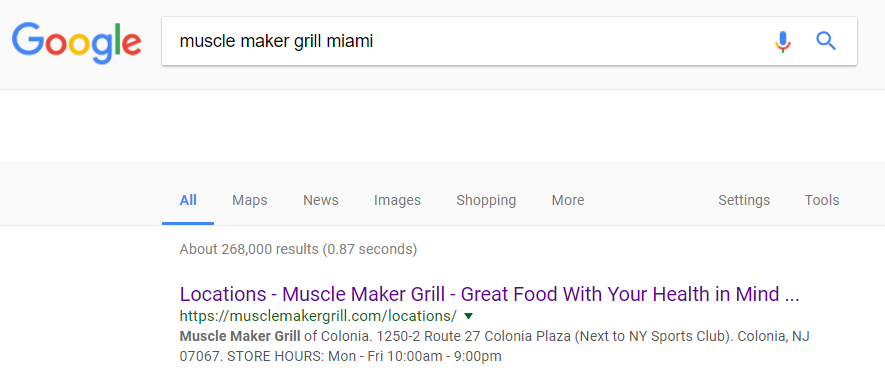
This is because they don’t have specific locations pages.
Take the SEO element out of it for a moment and just consider the user experience element; when I as a user search for a specific business why should I have to go through multiple steps to find it?
The answer is, “you shouldn’t.” This can be solved by a dedicated page for the business that is located in the city I searched for.
Here’s an example of a company that did it right:
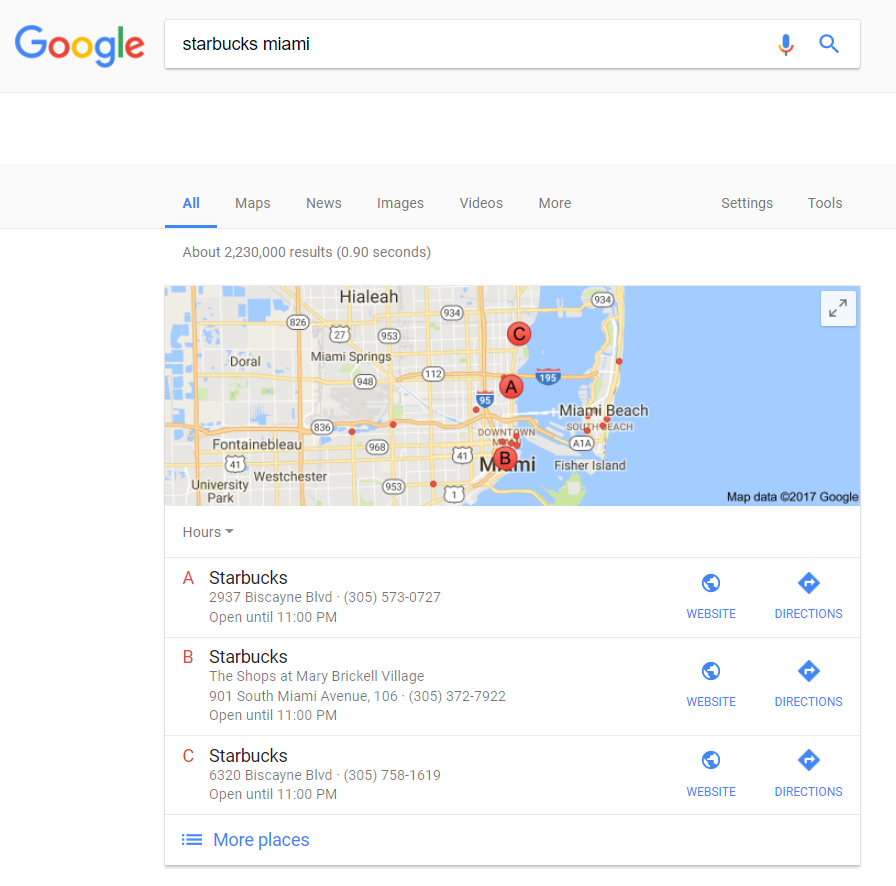
You see, Starbucks’ various locations come up for the search, as they should. And if we click the website links in the map pack, we see that they link to individual company pages, not a central one:
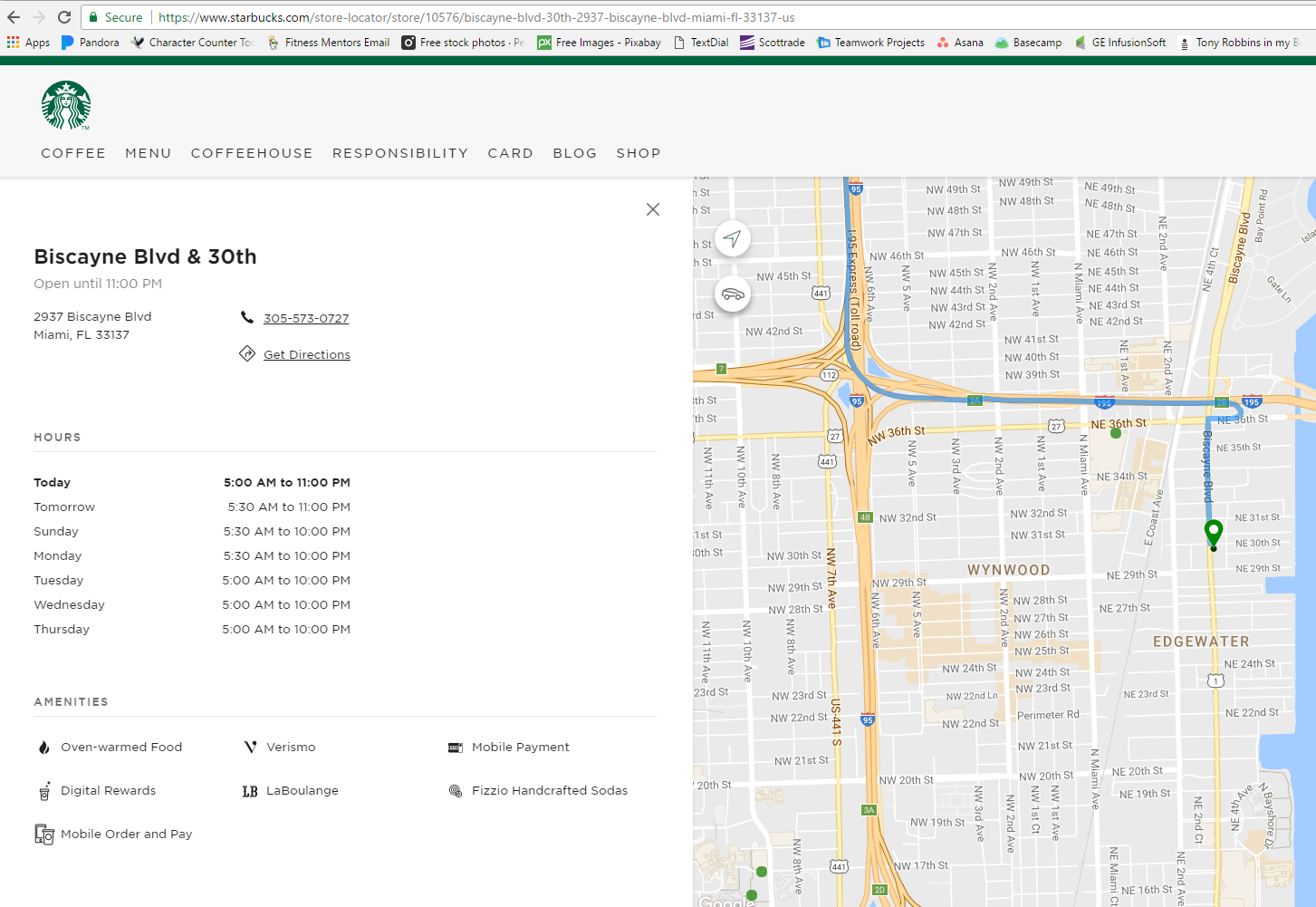
We’ll refer back to this page as a good example later in the post.
To expand on this recommendation of a dedicated page for each location, make sure that your newly constructed individual pages are actually indexable by Google and other search engines. If Google can’t find these pages and index them, they won’t be able to deliver the results to users.
Quick input on local meta data
Title Tag Format:
Local geo-indicator | Article | Brand Name (ex. Biscayne Blvd. Miami Coffee Shop | Starbucks)
Meta Description Format:
You’ll want to shoot for about 150-160 characters and include your target location in the meta description. You may also want to add your phone number to cater to mobile searchers who want to quickly call.
H1 Heading:
You can use a similar tag here as you do with your title tag. (ex. Biscayne Blvd. Miami Coffee Shop)
Multiple Local SEO Domain & URL Strategy
In a recent and highly recommended Search Engine Land post by Andrew Beckman on the domain structure of multi-location SEO, we can summarize a few talking points that you’ll want to consider when creating your domain structure and URLs for your locations.
Beckman discusses what are called “centralized” and decentralized” multilocation SEO strategies. The Starbucks example of what to do above, is centralized, meaning the franchise or top of the chain manages how their local businesses are managed.
This is in comparison to a decentralized local SEO strategy where local businesses under a brand are free to create their own website landing pages and domains instead of keeping them centralized on one domain like Starbucks does.
Here’s some examples from the Search Engine Land post of why the decentralized approach is a bad strategy.
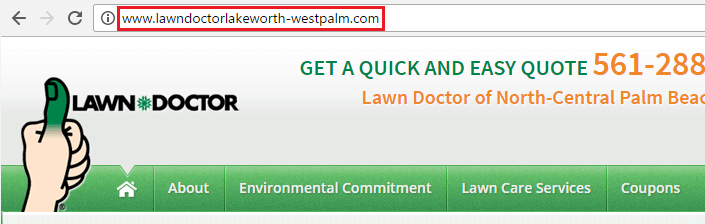
The above domain is an example of a branded domain with a geographic modifier, the “lakeworth-westpalm” portion of the domain. What would have been better is:
lawndoctor.com/locations/lakeworth-westpalm/
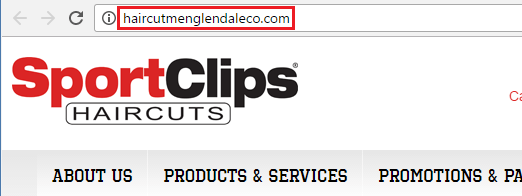
In this case, the Sports Clips franchise doesn’t make mention of the brand in their domain whatsoever. They, unfortunately, were given the freedom to create their own domain, geo-modified for their Glendale, CO area.
Recommended URL:
sportsclips.com/locations/glendale-co/
Why a Decentralized Local SEO Strategy is not What You Want
The post mentioned goes into a lot of detail on this, so I will summarize why decentralized is not good for a multilocation local SEO strategy:
- This makes each location responsible for its own local SEO, making it vulnerable to mistakes which ultimately can hurt the parent brand.
- This creates an extra and unnecessary expense as the brand needs its own separate campaign.
- This negates the ability of the sub-locations to share domain authority that would exist across one domain. Links, content, and brand mentions are spread across the web, rather than in one location which would assist all locations in ranking for non-branded searches such as “men’s haircuts Glendale, CO,” which is what you are really after with SEO anyway.
Recommended URL Strategy for Multiple Locations
Here’s what your multiple location URL strategy should look like:
This is the page that mentions all of your locations.
examplesite.com/locations/
This is a page of a specific location.
examplesite.com/locations/location-a/
*Notice the locations are in the sub-directory, not the sub-domain (glendale.examplesite.com).
Using the Extra Mile Approach for Multi-Location SEO
The Extra Mile Approach I am about to discuss is definitely one of those things you have to determine based on your personal needs. When trying to rank a location, you’re challenged not only by the proper setup of all that is mentioned on this blog post, but also the competition of the local businesses you are trying to outrank.
Your website may already have the advantage of being “centralized” and having a bunch of subdomains and a site that has an excellent Domain Authority, therefore increasing the likelihood all your locations will rank in their respective areas.
However, let’s say you have a location that just is not making the cut although you’ve done everything right. You may have to go the extra mile and create what is essentially a micro-site around the location.
Before we get into that, here’s why your local competitors might be outranking you.
Let’s say a local non-multilocation business has a website and is doing local SEO. Every page on their site is likely optimized for that location/city, sending Google lots of signals that help it rank for all types of searches related to that business.
Your multi-location business, however, only has one page dedicated to the location (examplesite.com/locations/location-a/), providing you much less opportunity to push the same local signals as the mom and pop down the street.
The Extra Mile Approach, and solution to this, is the micro-site or sub-pages of your sub-page. Let’s look at an example of what this would look like for you:
Right now, you have one local SEO page for one of your business locations:
examplesite.com/locations/location-a/
But, you need to give this location some more juice so it ranks, so you build out more content around it on additional pages, using the existing URL structure:
- /locations/location-a/gallery/
- /locations/location-a/reviews/
- /locations/location-a/directions/
- /locations/location-a/blog/
- /locations/location-a/blog/post-1/
- /locations/location-a/blog/post-2/
This type of content will provide lots of additional geo-targeted content that allows you to compete with the other websites that have tons of other local search signals you might have been missing out on. Some ideas for these sub-sub-pages:
- Gallery– Pictures of your shop, local events, etc. Optimize the images with local identifiers to give yourself even more juice.
- Reviews– You can recreate all your local 5-star reviews on a page. This works especially well for those particular searchers who specifically type in “[brand name] [city] reviews,” and trust me, a lot of people do this. More on reviews below.
- Directions– Make this as intuitive as possible, with not only an embedded map but even instructions from the north, south, east, west.
Admittedly, the Extra Mile Approach for local multi-location SEO is time-consuming. But done properly, it will surely make more people drive the “extra mile” to come to your business instead of the other guy.
Google My Business for all Your Locations
The next step after setting up your locations on separate sub-directories is creating (or updating) Google My Business (GMB) pages so that they point to your new sub-directories.
A common error I see with brands big and small is that they point the link in the GMB profile to their homepage. Google clearly states in their local guidelines that you should “provide one website that represents your individual business location.”
Optimizing Your Google My Business pages
Make sure all your business page information is the exact same as on your GMB page.
Name: This is to be your exact business name, not the business name and location. Look at the Starbucks example above, the locations are all called “Starbucks,” not “Starbucks Miami” or “Starbucks Biscayne Blvd.”
Address: The website should be an actual brick-and-mortar location and be consistent with how it appears on other websites and your website. Don’t use P.O. Boxes or your friend’s business address in another city to appear bigger than you are (Google will find out).
Phone: You’ll want a local, dedicated phone number, per location, listed in your GMB. If the business has one phone number for all locations, you’ll run into trouble. You can always try to get a Google Voice phone number and forward it if you must.
URL: As mentioned, this should be the URL of your individual location page (examplesite.com/locations/location-a/), not your homepage.
Categories: Choose the most accurate category for your business as the primary category. Don’t go all bananas choosing multiple sub-categories thinking you’ll rank for everything; you won’t. Check out this (somewhat unknown) common category list.
Complete Profile: Make sure to complete as much of your profile as possible. Logos, photos, business hours, fax, etc. Everything you can to help your potential customers, and Google, out.
Consistency: For multiple locations of the same category, ensure your categories are the same for location-to-location.
Citation Management: NAP
After you’ve properly setup your website and optimized your Google My Business pages, now it’s time to build citations. The most important thing you’ll hear SEOs talk about with citations management is “NAP,” which refers to Name, Address, and Phone number.
The NAP is important because consistently having the same NAP on all your citations helps you rank. Not doing so hinders your ranking ability. This is important because some citation sites will pull data from other areas, called aggregators, and this information can often be incorrect.
For example, say you start claiming citations and you notice that Yelp has a listing for you already. Thing is, maybe the phone number is wrong. There is an obvious human element here that should be a major concern (you don’t want people calling the wrong phone number), but you don’t want Google to index all these listings of yours and see that they are consistently inconsistent.
This will affect your ability to rank locally, which is why a citation campaign often involves two aspects:
- Claiming of new citations
- Cleaning up (and claiming) inaccurate citations
How do you manage citations you ask? Well, there are a number of local SEO resources that will help you do this:
- BrightLocal – a citation building company
- Whitespark – a citation building company
How Many Citations Should I Build Per Location?
As many as it takes for you to rank is the simple answer. At Digital Elevator, we traditionally build about 80 citations for our clients, mixing the high-power citations (like Yelp, Bing, YellowPages) with niche, local directory listings.
Take the SEO element out of it for a second and consider how important it is for your business to appear properly across the web. Many of these citation sites – Yelp, TripAdvisor, Angie’s List – get millions of visits, so it pays to be featured in all the possible locations your potential customers might be hanging out.
Put in the SEO element, and you’ll be a rock star in search engines and on these other sites.
Local Business Reputation Management & Reviews
You heard it here first, good SEO doesn’t fix bad business. If you knock on your SEOs door and you have a local business with 3-star (or lower) average ratings, don’t expect a quick fix.
Here’s some further proof that online reviews are an important aspect of your local multilocation SEO strategy:
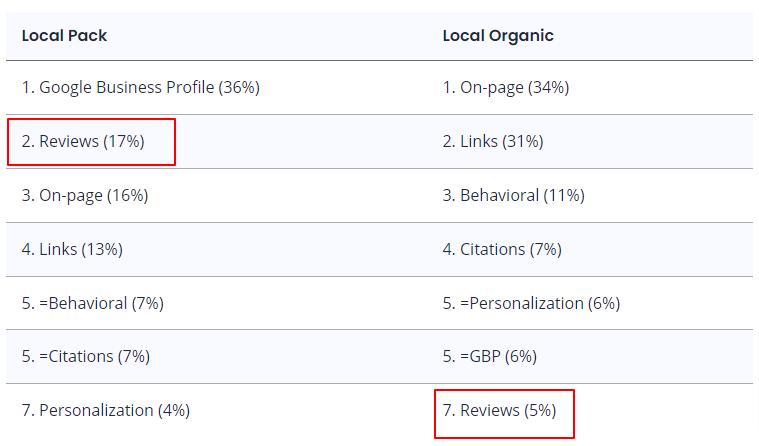
As you can see in the graph above, reviews are the second most important aspect of ranking in the local map pack and the seventh most important aspect in local organic rankings.
Local SEO Review Strategy
Without going all willy-nilly into what you should do, I like the approach of the following strategy that we often use for our clients:
- Have your clients get an email/cell phone list of all of their new clients (existing clients will work too)
- Send an email/text to all these clients asking them to review you
- Have two clickable options on the email/text:
- One for “I had a 5-star experience”
- Another for “I was dissatisfied with the level of service I received”
- For users that clicked the favorable response, take them to a page on your site that has direct links to the review sites you want to promote the most
- For users that clicked the dissatisfied response, take them to a page on your site that provides the following:
- An apology as to why they did not receive the level of service they expected
- Options to communicate why: email, phone, a form
- An offer to make things right if they connect with you and tell you why
I find this approach works well for pushing reviews to the sites that people want to use. It also alleviates some of the low reviews you might get because people always like to know that a company cares about them.
You can also take an easier route and try to automate reviews with a text messaging-based application such as Birdeye or Klaviyo.
I recommend sending customers a direct Google My Business reviews link. Check out Whitespark’s free tool to create these links.
Multilocation SEO FAQs
What is multiple location SEO?
Multiple location SEO is the process of ranking each of your business’s locations for the respective geographic region with the goal of top rankings in search engine results pages.
How do I optimize SEO for multiple locations?
The steps to optimize your website for multiple locations are summarized as follows:
- Setup and optimize Google My Business for each location
- Create a location page on your website for each location
- Link Google My Business locations to the respective website pages
- Get reviews to each location
Do location pages help SEO?
According to reputable industry surveys, location pages are the third most important aspect of ranking in the local maps and the most important part of ranking in organic results.
How do you add multiple locations on Google?
Simply login to Google My Business and click the “Add business” button. You’ll have the option to add a single business or add multiple businesses via a downloadable template.
Do Local Multilocation SEO Like a Pro
Now that you are armed with a wealth of data of what to do and what to avoid, you’ll be able to fix or optimize all your listings going forward. If you have a lot of locations, you may find that the hardest step is getting started, not optimizing your website, Google Pages, building citations, and boosting reviews.
If you need help with your multilocation local SEO strategy, reach out to Digital Elevator today to learn how we can help you.


