Did you know that 71 percent of consumers use search engines to find products, and an even higher percentage uses search to make informed purchasing decisions by researching and comparing products?
The importance of content marketing in ecommerce is something that can not be ignored.
To be successful with content marketing, however, you must stand out from the crowd. Today, we will be looking at five types of ecommerce content marketing that will win customers and help you stay ahead of your competitors.
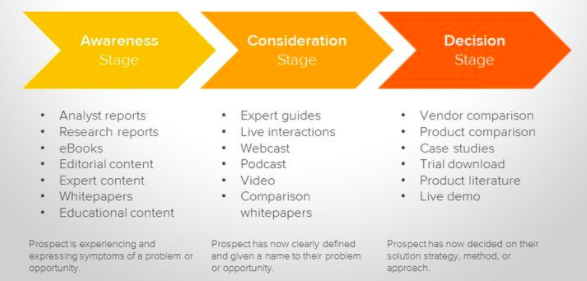
1. Target Different Stages In The Buyer Journey
Hubspot
Most customers don’t purchase from you the first time around. It’s important to map out the buyer journey process, from when they first see your ad or land on your website to when they finally make a purchase – and beyond.
Remember that the buyer journey doesn’t end with a purchase; instead, it continues as the customer comes back to make a second purchase or renew their subscription.
You should be creating content that targets every step in the buyer journey. To do that, you first have to map out that journey.
Here’s a simplified example of different steps you can be targeting:
Research: During this phase, the customer has a problem and is looking for a solution. They may not know what kind of product is available to help them. Your job is to show them, in your blog posts, how your product or service can help them solve this problem.
Purchasing Decision: During this phase, the customer already knows that there is a product or service that can offer relief. However, they are still undecided as to which company they will purchase from or whether or not it is worth their money.
Unsatisfied Consumer: These are consumers who have purchased the product from somewhere else but were not satisfied. You can step in and show them how you will do better.
Your Existing Customers: You can create blog posts explaining to your customers how they can make the most out of the product they purchased, how they can get help if they need it, and so on. This can help drive repeat sales.
If you only target the research phase, for example, you may be losing out on sales. Customers who are in the purchasing decision phase are easier to convert, as they are already further along in the journey.
Hubspot has many templates and customer journey examples you can use to map out your own customer journey.
2. Product Information And How-To Posts
Another type of blog post that can bring in sales are those that go over specific product information. For example, you can write reviews of your products so that consumers can find out its details, what it does, and how it can help them.
Make sure to include all the details in an easy-to-read manner. One way is to include visual charts or graphs, such as size charts if you are selling clothing.
You can create video guides and how-to posts using a video editor online that shows users how to solve common problems. Make sure to include the use of one of your products as one of the steps in the guide and include a link to the product page.
Video guides and product reviews, both on your website and YouTube, are also very effective.
Salesforce does this on its YouTube channel – here is an example of a short, engaging video that explains how one of their features can help small businesses.
3. Live Content
Live content helps you build a personal relationship with consumers. It’s easy to start – you can use Facebook Live or Youtube to stream live videos with Q&A sessions, upcoming product launch announcements, industry news, inside-the-company sneak peeks, and more.
Your audience can ask questions and comment, and you can reply to them in real time.
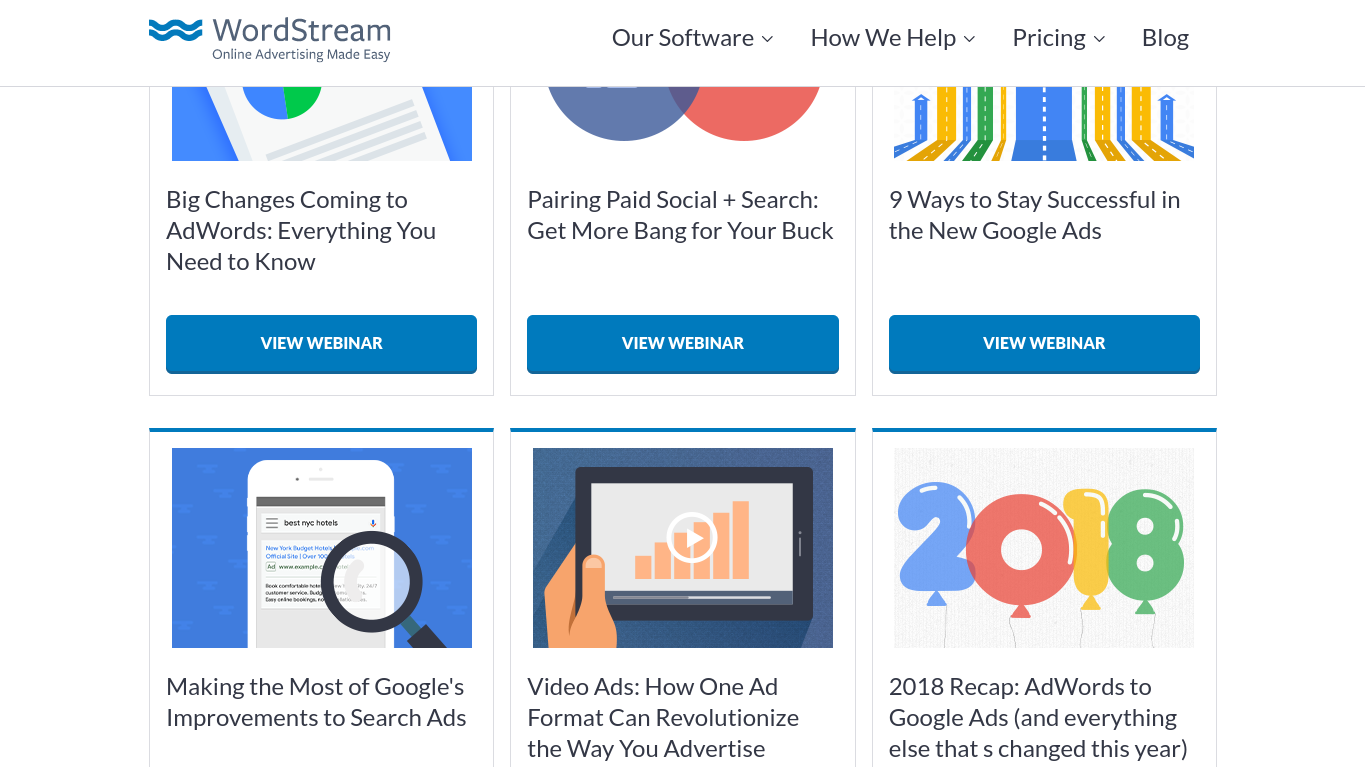
You can hold webinars for more in-depth discussions or for bigger launches. WordStream holds regular webinars and then posts the recordings to an online library so customers can access a wide selection of recordings on different topics.
4. Podcasts
Many consumers won’t have time to watch webinars or tune into live streams. Some may not even have the time to read blog posts.
This is why podcasts are so important. Your audience can listen to podcasts on-the-go, during their daily run, or while commuting to work.
Podcasts give you an opportunity to interview influential figures in your industry, which adds to your authority and credibility. It also exposes you to those influencers’ fans. For example, as a beauty influencer, you could interview a top makeup artist, which not only enhances your credibility but also introduces your brand to their dedicated followers.
Another reason podcasts are so important is because they drive more repeat visits. If you release an interesting, fun, and informative podcast on a regular basis, people will keep coming back to hear more.
The more traffic you have visiting your site, and the more repeat visitors you have in particular, the more sales you can expect. Remember what we said about the buyer’s journey – people don’t usually make a purchase the first time around.
Neil Patel releases podcasts in his online “Marketing School.” These are daily, 5-10 minute podcasts, but you can also release longer-form podcasts once a week, for example.
5. User-Generated Content
User-generated content can be effective as it gives you social proof. It’s not just you talking about your product and how great it is – it’s others doing it as well.
Did you know that 84 percent of consumers trust online reviews as much as they trust recommendations from family and friends? This is why social proof is so important.
Reviews and testimonials are one form of user generated content. Encourage customers to leave reviews on your products by sending followup emails after their purchase. It’s always a good idea to keep customers engaged. Upselling becomes easier as a result.
Manage your online reputation by posting guest posts on other blogs so that those posts appear when someone does a Google search about you.
Post testimonials, including video testimonials, on your site and YouTube channel. Video testimonials from real customers add a more personal touch – stories are important in appealing to consumers’ emotions and influencing their opinions.
However, user generated content goes beyond that. You can create a page on your website or a series on your YouTube channel that is dedicated to answering real questions from real users.
On your social media channels, you can ask users to submit content such as pictures of creative ways they are using your product or how they are using your product in their daily lives. Offer discounts or sweepstakes to encourage submissions. Before posting, consider using editing tools to sharpen images and enhance clarity for a more polished look.
Twitter and Instagram are great places to do that. Instagram is very visual in nature, making it easy for people to post selfies, and both platforms let people contribute to your campaigns using hashtags.
Starbucks shows the perfect example of how to do this. Every year, they hold a Red Cup Contest, where users submit pictures of themselves drinking Starbucks coffee for a chance to win a gift card.
This particular contest also directly drives up sales by encouraging consumers to buy more coffee so they can post more pictures.
BMW takes advantage of user generated content as well by encouraging users to post pictures of their beloved BMWs with the hashtag BMWRepost, which has generated more than 1.5 million posts.
Wrapping It Up
Content marketing, when done correctly, has the power to explode your sales.
Start creating the five types of content mentioned in this article to see new visitors flow in and your profits go up.
In a time where AI content writing is taking the place of humans, the need for specialized science writers has never been more demanding. As advancements in life science and biotechnology are constantly evolving, getting your message across clearly and accurately can spell the difference between communicating clearly to an acquisition partner, or failing short of impressing your target audience due to poorly executed content.
Science writers, and therefore accurate scientific content, can span multiple sectors such as healthcare, tech, and environmental science. They can also be utilized beyond research or technical writing, for marketing purposes.
Whether you are hiring science writers, require one for marketing, or want to get into a scientific writing career, there is something to learn in this post.
What Does a Science Writer Do? Science Writing Careers
Marketing Communications
At Digital Elevator, our biotech marketing agency understands that translating complex scientific concepts into clear, engaging content is essential for effective marketing communications. Our science writers, typically PhDs, often play a critical role here, helping businesses and institutions develop blog articles, service pages, and other high-value content that resonates with their audience. From educating readers on groundbreaking research to supporting product and service narratives, skilled science writers bring expertise to every piece they craft.
Science Journalism
Science journalists make scientific developments accessible to broader audiences by crafting stories for mainstream publications, niche science magazines, and news outlets. They may write for online news platforms, print magazines, or broadcast channels, translating complex information into formats that keep the public informed and engaged.
Public Communications
Science writers working in public relations and communications develop press releases, reports, and content for governmental agencies, research institutions, and professional societies. They frequently work with universities or research groups, often assisting with grant proposals, reporting breakthroughs, and fostering public interest in scientific advancements.
Technical Writing in Industry
Within private industry, technical writers focus on creating product documentation, technical bulletins, and press releases tailored to scientific and engineering audiences. Their work ensures that complex details are clearly conveyed to technical stakeholders and assists in the creation of technical papers that showcase industry innovations.
Editing and Content Refinement
Science editors work behind the scenes to polish and refine articles for academic journals, tech and science publications, and government reports. Whether for digital magazines or scientific journals, these editors ensure that all content is accurate, clear, and consistent, helping maintain high-quality standards in science communication.
Key Skills to Look for in a Science Writer
When hiring a science writer, it’s essential to look for a blend of specific skills that ensure content is accurate and compelling. As it relates to marketing and search engine optimization (SEO), this also means the content is optimized for reach. Here’s what top-notch science writers bring to the table:
Scientific Knowledge
A strong foundation in science is critical. Effective science writers understand core concepts and terminologies, making it easier for them to convey complex information accurately and without losing nuance. This knowledge allows them to communicate with authority and clarity.
Adaptability
Science writers often handle diverse topics, from healthcare innovations to environmental science and tech advancements. The best writers can shift seamlessly between subjects, keeping content relevant and tailored to the specific needs of each project.
Industry-Specific Insight
Each industry has its own language, audience, and approach. Science writers who can align their work with industry-specific expectations add value by producing content that speaks directly to the audience’s needs and interests.
Industry-specific insight may be related to work experience or education. For example, if you are focused on PhDs, you may want to seek science writers with that specific education. MDs or DOs are also science writers, as are those with MBAs, or general degrees. Consider this as you perform your research and weigh how important it is to you.
At Digital Elevator, we carefully vet our science writers for these skills. Each writer is selected for their ability to combine deep scientific understanding with the adaptability needed to produce high-impact content. As it relates to SEO and writing content for search engines, we generally look for writers who can follow our keyword research content briefs but also have skills in copywriting.
Where to Find Qualified Science Writers
Finding qualified science writers is not difficult to do given the wealth of platforms with highly skilled professionals. However, the type of writing you need may shift your focus to one platform over another.
Specialized Marketing Agencies
If you need marketing-related scientific content such as website content, blog posts, white papers, resource pages, or product and service pages, working with an agency like Digital Elevator will be your best bet. Working with an agency ensures the best writers are already pre-qualified for you with the added benefits of an editorial team, SEO team, and graphic design team, if needed.
Kolabtree is the most popular platform for connecting with freelance science writers, often with no agency affiliation. You can select them by area of expertise, view their previous projects, and even have them bid on your projects.
Upwork is a popular freelancer platform, although it is not specific to the scientific community as is Kolabtree. The writers here may bill less per hour, but are likely to be slightly less qualified than what you might find on Kolabtree.
NASW has a database of 1,000s of science writers along with their expertise. Given the primary focus of the organization, it is a great place to find writers. The downside is that filtering options are not as robust as Kolabtree, requiring a bit more manual work to find writers.
How Much Do Science Writers Charge?
The rates of science writers vary depending on the level of expertise, their specific scientific background, and whether you require additional editing and proofreading services as you would get with an agency.
Agency
At an agency, expect to pay $250 to $400 per hour. Keep in mind this often comes with editorial processes, copywriting expertise, and done-for-you publication.
Freelance writers
Freelance rates can vary greatly depending on expertise, ratings within a given platform (writers with fewer or no ratings will often be cheaper), experience specific to scientific writing, education, and country of origin. Expect to pay anywhere between $50/hour and up ($100 an hour seems to be a common rate), and flat fee rates of as much as $2,500 for specific types of content, like blogs.
Science Writer Salary
Should you want to hire a full-time science writer or if you are a science writer wondering what you can expect, here is some information that will be helpful.
You can never provide too much context or information to a writer. Giving examples, providing content outlines, or setting expectations around quality and rounds of edits should be done upfront. If you are working with a new science writer, start with a small project before investing in larger projects to get an idea of how they work and how you like their communication, availability, turnaround time, and quality.
Work with Our PhD Writers
If you need scientific writing services or content related to marketing communications, contact Digital Elevator today. We can help you strategize, research, and execute specialized life science or biotech content writing content with a specific focus on promotion and marketing.
If you are a science writer and are interested in joining our pool of vendors, feel free to drop us a line as well.
FAQ
What should I look for in a science writer?
When hiring a science writer, prioritize candidates with a solid foundation in scientific knowledge, proven adaptability across topics, and a talent for storytelling. Look for writers who understand SEO if your content needs to be optimized for search engines. Additionally, consider any industry-specific experience or relevant degrees (such as PhDs, MDs, or MBAs) that align with your content needs.
What industries benefit most from science writers?
Science writers are invaluable in sectors like healthcare, biotechnology, life sciences, technology, and environmental science. They help communicate complex ideas clearly, supporting areas such as marketing, public communications, product documentation, and academic publishing.
How do I know if I need a freelance or full-time science writer?
Consider a freelance writer if your needs are project-based or if you require specific expertise periodically. Full-time science writers are ideal for companies with ongoing, diverse content needs. An agency can also bridge this gap, providing vetted, highly qualified science writers with editorial support and SEO expertise.
How much should I expect to pay for a science writer?
Rates vary based on expertise and format. Agencies may charge $250-$400 per hour, typically including editorial support and SEO services. Freelance science writers range from $50 to $100+ per hour or may offer flat-rate fees for specific content types. Full-time science writers typically earn annual salaries between $70,000 and $147,000.
How can Digital Elevator help me find the right science writer for my needs?
Digital Elevator connects you with highly qualified science writers with PhD-level expertise. Our vetted writers, backed by our editorial and SEO teams, are skilled in translating scientific content into compelling, marketing-friendly materials tailored for your audience. We can handle everything from research and content strategy to polished, publication-ready copy.
Hire science writers from Digital Elevator today.
Schedule a discovery call today to discuss your content writing needs. Our team specializes in content writing for marketing purposes, written by PhDs.
So, you’ve established an idea for a YouTube video – a concept, visuals, script. You’ve been busy writing, planning, projecting, and casting. But what about background music?
You weren’t planning on a silent movie, were you? Surely your video needs sound to be complete.
Your next thought is okay, I just have to surf through my playlists and grab some great tunes. Not so fast.
Unfortunately, there is a caveat.
Videographers beware of copyright infringement.
YouTube has rules, and you’d better follow them or your debut will never hit the box office.
Shedding Light on Copyright Laws
It would be helpful to understand music copyright laws so you can stay out of trouble. Although it’s true that music is protected once “maestro” sets his or her notes to paper or recording, it would require something more concrete than that to win a battle in the judicial system. Know the following steps to complete the beautiful cycle of your video production process:
To really establish full protection, the composer must register his or her piece with the U.S. Copyright Office. Courts don’t like grey areas. This fills in the blanks with a black ink pen.
And forget the old “Poor Man’s Copyright.” This is the method where you mail yourself a copy of the work and keep it in a sealed envelope. Not happening with modern copyright laws.
A piece of music officially copyrighted through the proper channels offers airtight protection, so YouTube creators, don’t let your guard down.
Copyright Laws Restrict You From:
Reproducing the work
Adapting or arranging the work
Performing the work
Displaying, distributing, and/or selling copies of the work
What Will Happen If You Don’t Play by The Rules
The content police at YouTube are on the alert. Did you know that YouTube developed a Content ID system that can detect the illegal use of copyrighted music? You can’t fool YouTube. If they find that there is a misuse of content, your video can be taken down or blocked. The copyright owners can even track the video’s viewership statistics to determine if you monetized the video and should consider coming after you for funds.
How in the world would YouTube ever know if a music selection you plucked from the depths of the web is legal to use, you ask? They will more than likely find out.
Here’s the process:
YouTube created a Content ID system, essentially a database of copyrighted content
Copyright owners can use a system called Content ID to maintain their musical content on YouTube.
<span”>Videos uploaded to YouTube are matched against a collection of files that are stored in an internal database.</span”>
YouTube catches you red-handed. What happens next?
Your fate is in the hands of the copyright owners. On a good day, you may get a slap on the wrist. Or, the owner can initiate a Content ID claim.
They can force you to take your video down.
YouTube will slap you with a Copyright infringement strike on your profile. This may prohibit you from certain privileges as a user.
No Need for The Magical Mystery Tour
Not to burst your creative bubble, but now there is an extra step in the artistic process you may not have counted on. Content creators and film makers are faced with the daunting task of searching for non-copyrighted music for their project.
Or maybe not.
Music to Your Ears: Where to find Non-copyrighted Music
Fortunately, there’s a treasure trove of non-copyrighted music out there. I’ve done the research, and there’s a pretty robust list of musicians and entities offering their music free of copyright restrictions.
This is a global effort to share music legitimately. They’ve built platforms that make it easy to navigate royalty-free, non-copyrighted music works, with the intention of collaboration and creative cooperation. You may have to properly attribute the work according to the agreement executed by the creator. But it’s pretty easy to explore; you simply search for the genre or style of music you’re looking for and you will be directed to a host of options. The individual piece you are interested in will have its usage parameters posted clearly.
I really like this anthology because of its simplicity and streamlined catalog. Visually it’s very easy to maneuver through collections. There’s a generous amount of music to choose from, covering jazz, rock, cinematic, acoustic, and more. The covers are finished with artsy images, making sifting through the selections an engaging, fun experience.
With a cool and funky vibe, users are invited into a surreal universe of tracks with virtually infinite musical compositions. Although they house the usual contenders like dance and retro, their approach is slightly off-beat offering titles in the creepy, sneaky, and tense domains as well.
If none of these options suit your fancy, here is a short list of other places to find copyright-free music:
I also spoke to Tim Stockman, CEO of Blue Dog Video, to get his take on where video production companies are getting their music. He said he uses a combination of Audio Blocks and Audio Jungle. “Sometimes to find the perfect audio clip,” he says, “you have to pay. But you’ll find the music much more original.”
If you venture out on your own to hunt down other sources for non-copyrighted music, just be careful to read the fine print. Some websites charge hidden fees for usage, don’t adhere to restrictions in their entirety, or prohibit use in certain situations. Hell, even this list is subject to change. If you see any that are no longer free or have suggestions to this list, please let me know in the comments.
When it comes to your YouTube video you worked so hard to create and publish, better to be safe than sorry. Be sure the music you choose abides by the copyright rules set forth by YouTube.
Non-copyright Music FAQ
How to know if a song is copyrighted on YouTube?
If you are unsure whether a song is copywritten on YouTube you can do a number of things to check:
Check the Public Domain Info site for the track in question. This site will tell you if it is ok to use the song on your videos.
Look up the song on YouTube. If you find the original artist, the track should provide copyright information in the description under the “Music in this video” section. You can also do this if you hear a song in a different video and want to get song information.
Upload your video as private and allow YouTube’s Content ID system to check for you. If your song is copywritten, you’ll get a warning.
Hire a company that helps with copyright law.
How to legally use copyrighted music on YouTube?
The most basic answer to this question is that you have to get a license from the copyright owner. For more specifics on using copyrighted music on YouTube, check out this resource.
What are some popular songs that aren’t copyrighted?
Need a familiar tune to complement your video? Good news, there are some songs available in the public domain that you can use. Check out these resources for some detailed lists:
Unfortunately no, even parts of songs are protected from copyright restrictions.
NEED HELP WITH YOUR VLOGS?
Digital Elevator has partnerships up with high-quality, affordable, video production companies that work produce commercial-grade content as well as biotech animation companies that complement our biotech web design services.
Just how good is AI content from the lens of a professional writer/content marketer?
How does AI content compare to human-written content?
And which AI content generator is the best?
In this blog, I’ll start with a comparison of the most popular players in the AI content world, then get deeper into explaining what AI content means and how it works. I’ll also run each sample through a AI content detection tool to see how human-like the writing is.
Why should you trust me?
Because I’m smart and good looking. Not enough for you? How about because I’m the Content Marketing Director at Digital Elevator and have been a content marketer and writer for the last 15+ years.
Feel free to jump ahead:
Best AI Content Generators Compared
So, what is my experience with the leading AI content generators and which one is best? Let’s dive in.
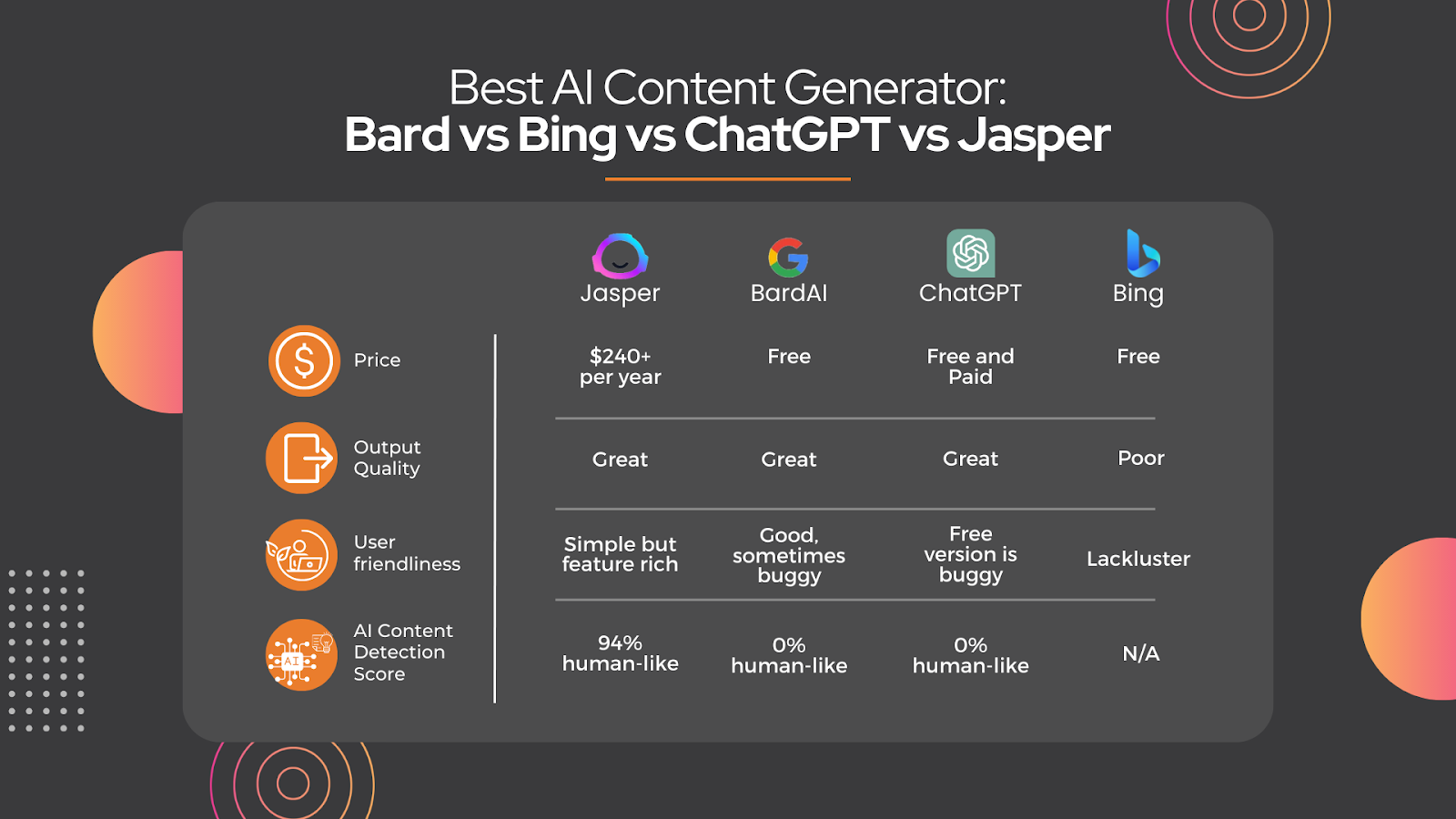
Jasper vs Bard vs Bing vs ChatGPT: Which Is Best?
I’ve tested all four of these options. Which ended up the best?
I tested many, many prompts, topics and requests on each one for my final opinions and pros and cons. But as a fair test to show you examples of, I asked each service the following prompt, exactly the same way:
“Write a 1000 word blog with the title ‘How To Make Money Online’”. I then pasted the results into a document and I’ve included links to see the exact outputs from each.
Note that I kept all formatting exactly as is – which includes the background after copying/pasting, any headlines, and bullet points exactly as they paste into a document.
So, without further ado, here’s what happened with each, and the pros and cons I gathered from multiple test uses.
Jasper
Jasper, formally known as Jarvis, was actually the first I tested out, as it was up and coming before the others made their big entrances. This means they’ve also had plenty of time to perfect, recently adding in a Chat feature similar to the others.
Jasper does cost money, but there are a ton of features you won’t find on other AI sites, like being able to select what it is you’re doing with a template. Examples of these include blog posts, emails, social media posts, conclusion paragraphs, ecommerce listings, and more.
Templates: As previously mentioned, the templates to choose from were plentiful, and I loved being able to tailor it to my needs without having to explain it.
Formatting: If it gave you an H2 and you copied it into a document, the H2 stays. All formatting copies over, giving you less work.
Output: Everything seemed to be smoothly written and accurate.
Surfer SEO Integration: While many AI softwares can write up things it finds scouring the web, Jasper also integrates with SEO engines that can make sure you’re not only writing factually, but you’re writing in a way that helps you rank.
Built for content creation: The others we tried have different uses. For example, Bing prides itself on being able to answer questions. Like, “where’s the best place near me for a haircut?”, rather than write content on your behalf.
Cons:
Cost: It has a cost behind it, but with the exhaustive features and productibility, may be worth it for a user, depending on budget and needs.
Bard
Google’s Bard content generator was initially a research project from Google that was aimed to generate original, high-quality poetry. Still in its early stages, it has since transitioned to be used for all types of written creative work.
Bard gives you three drafts to choose from, so here are the three outputs with the test topic here:
When I used Bard to write the sample content piece, here’s what I liked and didn’t like about it:
Pros:
Great content quality: The paragraphs were not choppy and everything seemed to flow in a human-like way.
Multiple options: Bard provides you with a few different options for your draft that you can choose between, rather than having to ask again for a different response.
Speed: Most AI generators use a live-typing display where you essentially watch the AI compose your piece word for word. While it takes a few seconds to pause after your query, Google’s Bard option displays everything immediately on the screen as one finished piece.
Cost: This one’s free, at the current moment.
Cons:
Google Rankings: While we can’t say for sure, because Google keeps algorithms and ranking determiners pretty hush-hush, there is always the question in the back of our heads: Will rankings be docked because Google clearly knows you’re using AI content (considering they wrote it)?
Can be buggy: To be fair, they do say they’re still in an experimental phase, so we can’t weigh this con too heavily. But when first trying to run this test with Bard, I was getting errors like, “Sorry, I’m not programmed to assist with that” – but if I’d try the same exact request a few more times and it would finally give me the output.
Formatting: Being a Google product, you would expect better formatting with H2s and H3 tags already built into the output for a blog (and that paste well into a Google Document)
ChatGPT
ChatGPT is a state-of-the-art language model developed by OpenAI that uses artificial intelligence to understand and respond to natural language queries. There were a lot of great things about this one.
Versatility: ChatGPT understands a wide range of natural language queries and allows you to select your tone and writing style from a multitude of options, from friendly to clinical, or even sarcastic.
Learns How You Work: According to OpenAI, ChatGPT is constantly learning and improving based on its interactions with users. The more you use ChatGPT, the better it becomes at understanding your specific needs and interests.
Prompt Options: I liked that there were different user-created prompts that are already customized to solve a specific problem. If it’s SEO content you want, or just something rewritten, there are many existing prompts to choose from if you don’t want to do your own.
Great output: The output for this option was very professional and, at first glance, sounded very human-like. There are also limited if any, grammatical errors.
Cons:
Availability: Unless you pay for the premium service, if ChatGPT is overloaded, you get a screen saying you can’t use it. This brings us to…
Cost: If you want to be sure you can use the service (and all of the tones, prompts, and conversation styles), you’ll need to pay a premium. Currently, this cost is about $20 per month. It’s also the only way to get access to the newest versions of ChatGPT.
Pasting Into Documents: When pasting your content into a document, it includes a gray background. If you want to lose the gray background, you have to paste the text unformatted, which means you lose any bullet points, bold wording, and subheadings as well.
Bing
Microsoft’s Bing AI generation is newer to release than the others, which I expected could potentially mean they have a leg up in making theirs bigger and better (spoiler alert: not the case). According to Microsoft, Bing AI shares licensing with OpenAI of GPT software, which you’d think might mean they have similar outputs, but I didn’t find this to be the case.
[Crickets] … I didn’t find a lot of things to praise this one about in comparison to the others. At least not at this stage of the game. Sorry, Microsoft.
Cons:
The browser: While there is nothing wrong with the Microsoft Edge browser (I’m just being nice, do people actually use it?), they force you to use it in order to take advantage of the browser-based Bing AI generator. They do integrate with things like Skype chat, where you can chat with the AI bot right in your conversations, but unless you prefer to do it this way, it’s not helpful when you have a browser of choice.
The output: Imagine waking a toddler up from a dead sleep and asking them to explain to you how one might boil an egg. It’s a simple question. But the answer might take 32 left turns before it arrives at anything worthwhile. That’s the output I seemed to get with every question.
Errors: Not only was the output almost as if they weren’t even “listening” to my question, I often received an error that said, “Sorry, I am out of ideas right now” with a sad face and an error ID code.
AI Content Detectors: Testing How Human-Like The AI Content Is
In addition to the initial tests, I also tested a couple of other random blog topics specifically to see how “human-like” each AI wrote. The blog titles I tested were:
The Importance of Self-Care: Simple Ways to Prioritize Your Well-Being
The Benefits of Meditation: How It Can Improve Your Mental Health
Maximizing Your Savings: Smart Tips for Building Your Wealth
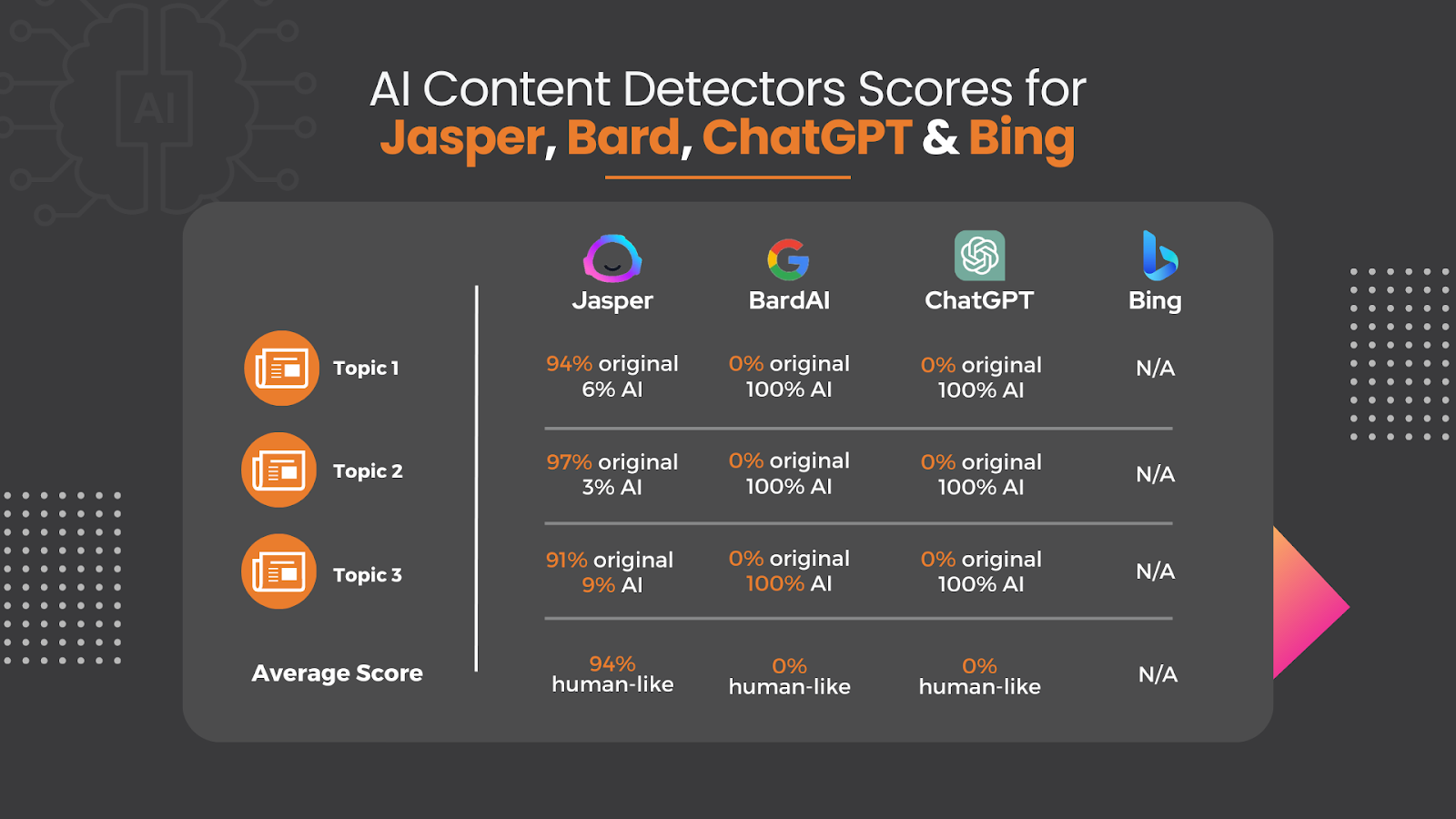
I ran each through a content-checker that analyzes the text and determines how “human-like” it sounds, or if it appears to have come from AI. From the three topics, I averaged the results, and here’s what I found for each:
Jasper
1. 94% original / 6% AI
2. 97% original / 3% AI
3. 91% original / 9% AI
Average: 94% human-like
Bard:
1. 0% original / 100% AI
2. 0% original / 100% AI
3. 0% original / 100% AI
Average: 0% human-like
ChatGPT:
1. 0% original / 100% AI
2. 0% original / 100% AI
3. 0% original / 100% AI
Average: 0% human-like
Bing:
I wasn’t able to run the content through the detector, as Bing didn’t output actual blogs, but rather answered the question it pulled from the title and sourced where to find information on it.
Keep in mind, each AI content detector could analyze differently, and there are many options out there. But for this test, I chose originality.ai.
Note: Don’t get the originality scores confused with plagiarism – a low originality score does not mean the content is plagiarized – all content tested perfectly for plagiarism from every source – it just means it could be detected as being AI-written by a third party.
The Overall Winner
Jasper seemed to be the most original and unique content that didn’t get detected as being AI.
Besides the AI detection scores, ChatGPT is up there on my ranks for being quality content, and Bard is third. While the outputs appeared pretty on the outside, both ChatGPT and Bard’s results of the originality test were a huge turn-off – and a shock – especially since Bard is Google, and who hates unoriginality more than Google does?
Jasper had excellent outputs that sound very human-like and professional. I didn’t find any of them to give any inaccurate information, either.
Both of my top two picks (Jasper and ChatGPT) were also great at creating outlines for topics – so even if you don’t want to use AI to create the actual piece, they can provide an outline that steers you in the right direction and sparks some creativity.
That all being said, when it comes to writing actual blogs, not one of the four paid attention to word count. For example, if I said, “write a 1500 word blog on bumble bees”, it might give me back 400-800 words. So no matter which you choose to go with, I found it to be most beneficial when asking specific questions to generate responses to or to elaborate on subtopics I already knew I wanted.
If I were to choose just one to continue to use, it would be Jasper, with ChatGPT coming in a close second. Both come with a premium that seems well worth it for the increased functionality, content quality, reliability, and features. You get what you pay for, right?
What Is AI Content Generation And How Does It Work?
AI-generated content refers to any text, image, video, or audio content that has been created either entirely or partially by artificial intelligence algorithms. Yes, we’ve finally made it there.
These algorithms use natural language processing (NLP) techniques to understand and generate human-like language, allowing them to produce a wide range of content, such as news articles, blog posts, product descriptions, and social media updates.
AI-generated content can be created in different ways. One method involves providing the AI software with a specific topic or keyword and then allowing it to generate a complete piece of content based on its understanding of the topic and relevant data sources. Another approach involves using AI to assist human writers by suggesting ideas, phrasing, or correcting grammar errors in their writing.
Where Does AI Get Its Information?
AI content generators have a range of sources from which they can gather information. Some rely on structured data sources like databases, news feeds, or social media platforms, while others use machine learning to analyze unstructured data like text documents. The sources used can depend on the type of content being generated and the specific algorithm being used.
For example, if an AI content generator is creating a news article, it might gather information from reputable news outlets or wire services. If it’s generating product descriptions, it could use data feeds from e-commerce sites or product catalogs. Some AI content generators may even take inspiration from pre-existing content, using it as a starting point to generate something new and original (which is something we, as marketers and content creators, need to be cognizant of – I will get to that later in this blog)
Of course, as with any content creation process, the quality of the information used can have a significant impact on the quality of the output. That’s why it’s important to carefully evaluate the sources used by AI content generators to ensure that the information is accurate, reliable, and relevant.
Pros and Cons of AI-Created Content In General
AI-generated content has its advantages and disadvantages. Here are some of the pros and cons to consider:
Pros:
Efficiency: AI-generated content can be created quickly and efficiently, allowing businesses and individuals to create a large amount of content in a short amount of time.
Consistency: AI algorithms can ensure that the tone and style of the content remain consistent across a large volume of output, which can help to establish a brand or voice.
Cost-effective: By automating the content creation process, AI-generated content can save businesses and individuals money on content creation costs.
Scalability: With the ability to generate content at a rapid pace, AI-generated content can scale to meet the needs of even the largest content marketing campaigns.
Cons:
Lack of Creativity: AI-generated content may lack the creativity and personal touch that human writers can bring to their work, which can result in content that feels generic or bland.
Limited Understanding: AI algorithms may struggle to understand complex or nuanced topics, leading to inaccuracies or errors in the content produced.
Quality Concerns: Without proper oversight, AI-generated content may contain errors or inaccuracies that can harm a business’s reputation or credibility.
Ethical Concerns: There are ethical concerns surrounding the use of AI-generated content, particularly in cases where it is used to generate fake news or misleading information.
Search Engine Rankings: Because its so new, we have yet to see the longer term impact using AI-content might have on search rankings. To put it into perspective – if AI is writing your content, other AI (like Google spiders) could soon be able to tell what came from AI, and the consequence of that is a future mystery.
Overall, AI-generated content can be a valuable tool for businesses and individuals looking to create a large amount of content quickly and efficiently. However, it should be used as just that. A complement to your human-written work, not a replacement for it.
What do marketers think of AI-written vs Human-written content?
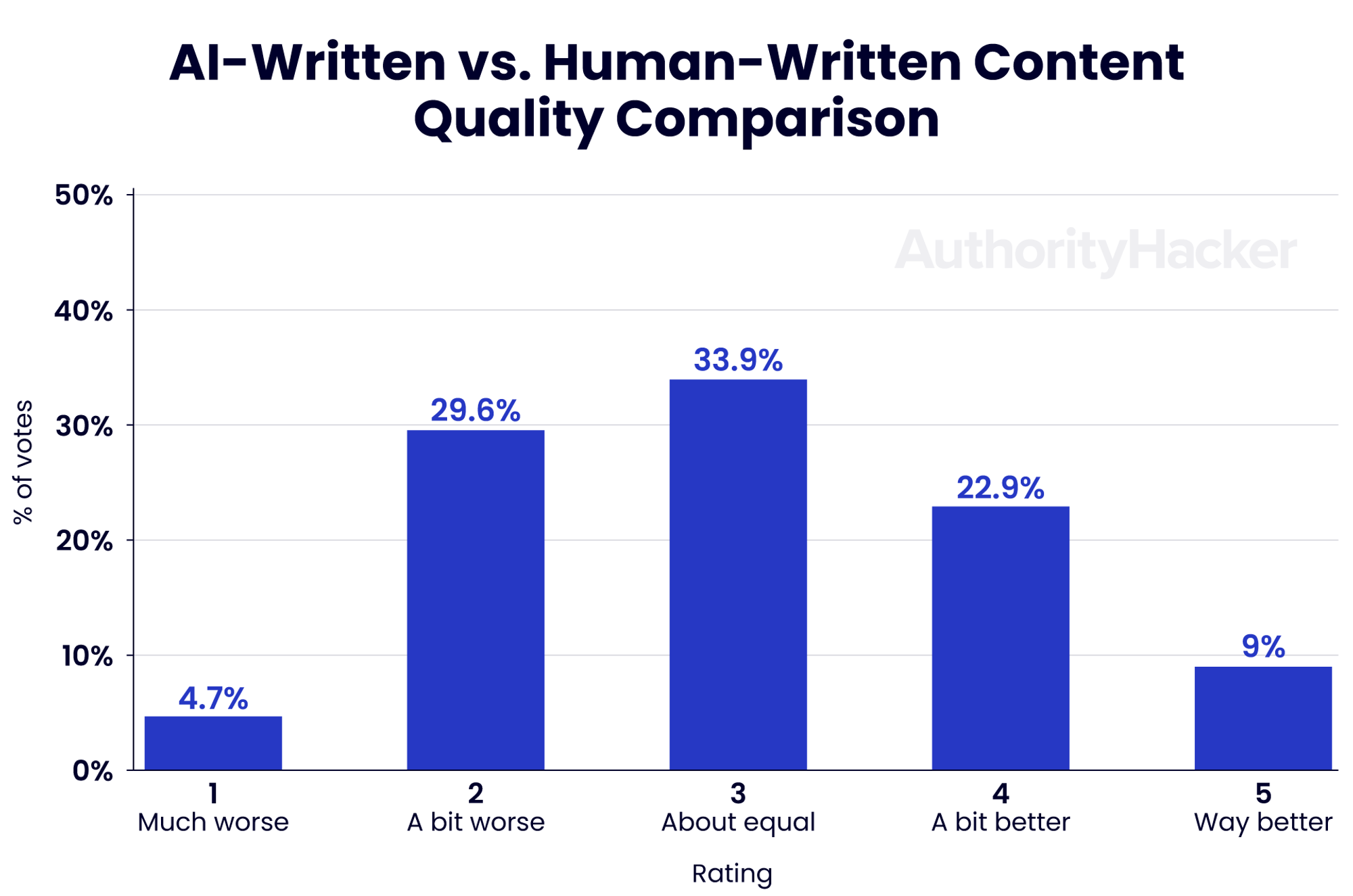
According to fresh data from a recent industry survey, 65.8% of people believe AI content to be equal to or better than human-written content.
The Future Of AI Content Generation
The future of AI-generated content is exciting and full of possibilities! As AI algorithms continue to evolve and improve, we can expect to see even more advanced and sophisticated forms of content generation.
One of the key areas of development is natural language processing, which will allow AI algorithms to understand and interpret language in a more accurate way. This will enable them to generate content that is more creative, engaging, and personalized to the needs of individual users.
Another area of growth is in the use of AI-generated content for immersive experiences, such as virtual reality and augmented reality. AI algorithms can help to create rich and interactive content that responds to user input and adapts to changing environments, creating a truly immersive and personalized experience.
There are also exciting opportunities for AI-generated content in the field of education and training, where it can be used to create interactive and engaging learning materials that adapt to the needs of individual learners.
Of course, as with any technology, there are also potential risks and challenges associated with AI-generated content. It will be important to ensure that AI-generated content is used responsibly and ethically and that proper oversight and quality control measures are in place to ensure accuracy and reliability.
Overall, the future of AI-generated content is full of potential, and we can expect to see even more innovative and exciting developments in the years to come that can help assist with your content creation.
In a day and age where Google is making organic search engine customer acquisition harder than ever and social media is being divided into more than a handful of popular networks email has remained a constant strategy that, to this day, is unwavering. In fact, research from the Direct Marketing Association has proven that email marketing has a ROI of around 4,300% and roughly 80% of people say they receive marketing emails right alongside their personal emails. Better still, around 40% of these people said that they enjoy getting marketing emails from their favorite brands every week.
While many of us whine about being on the receiving end of spam emails, if you’re anything like me you fully expect and welcome them from companies you’ve done business with. Emails from online retailers provide me with confirmations, updates, reassurances and special offers not always found in my general day-to-day perusal of the web.
Above I said that email strategies for retailers is unwavering when in fact, I lied. It is wavering but not in the downward way that you might think. According to data by Experian conducted during their most recent 2013 Q3 Email Benchmark Report:
Email volume rose by 12.7 percent in Q3 2013 compared to Q3 2012.
Unique open rates were up year-over-year by 6 percent.
If the writing is not already on the wall about email marketing for online retailers it will be very shortly (on my wall, I call it a “blog”). Below I have compiled six eCommerce-based emails that your brand must use to make your customers feel all warm and fuzzy when they get your emails. Three of the below are transactional and the other two help lead to the transaction. Let’s start with the transactional ones first.
3 Types of Transactional Emails
1. Order Confirmation Email
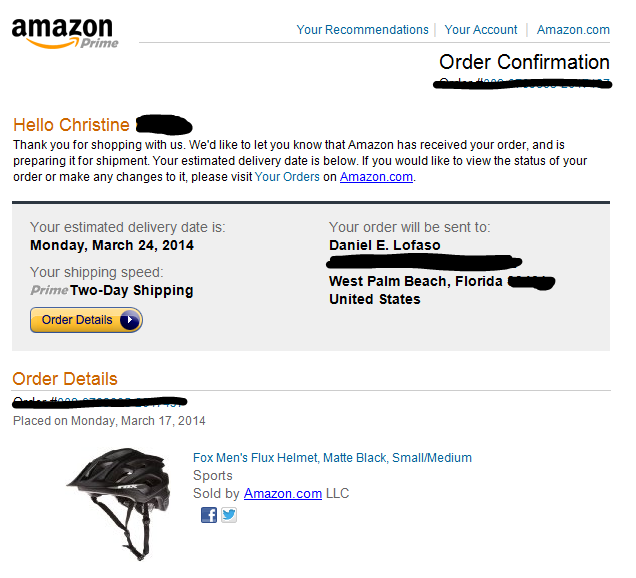
This email confirms to your customers that you have in fact received their order and that it is being processed and prepared for shipment. Generally, the order confirmation provides a summary of the purchase, the name and address of the recipient, shipping speed, and any other order-related information.
The order confirmation is fully expected immediately after the purchase and customers have grown accustomed to this email transaction after making purchases online. Viewed as the digital version of the purchase receipt, the order confirmation is a must-do for any brand who wants to instill confidence in their company and start the email communication between brand and customer.
2. Shipping Confirmation Email
The shipping confirmation email is a reassurance that the order placed by the customer is on its way. While some companies only provide the order confirmation and neglect to send the shipping confirmation, this email brings the customer into the light and keeps them aware of when they can expect the package. Like the Amazon.com screen shot below (can you tell I like mountain biking yet?), a well-crafted shipping confirmation email informs the customer that any changes to their order can no longer be made and directs them towards a link on the website where they can find out about returns or managing their other orders.
A bonus piece of information that Amazon.com provides is a link to track your package. With this link I know that I can log onto the UPS or FedEx website and determine where my package is. This is important to know if I shipped my package to a place that requires a signature or that may not be left if there is no one at the door.
While Amazon does provide customers additional ways to connect with the brand via their three social media links they don’t do a great job of incentivizing future orders. A good way to do this is by providing a “Recommended Products” or “Customers Who Purchased This Item Also Purchased” section below the shipping info. This additional information can encourage repeat sales and can easily be implanted into the email.
3. Order Follow-up/Review Email
Getting an email from a brand that thanks you for your order and checks in to see if you enjoy the product is like getting a phone call from your dentist on your birthday. Not only is it nice, but it makes me, the consumer, feel like a valuable customer.
When sending order follow-up emails take it a step further and ask satisfied customers to leave a product review or to share their experience on social media. Direct customers who may be unsatisfied to a separate email or customer service phone number to avoid negative online reviews.
3 Emails that Lead to the Transaction
1. Opt-In Email
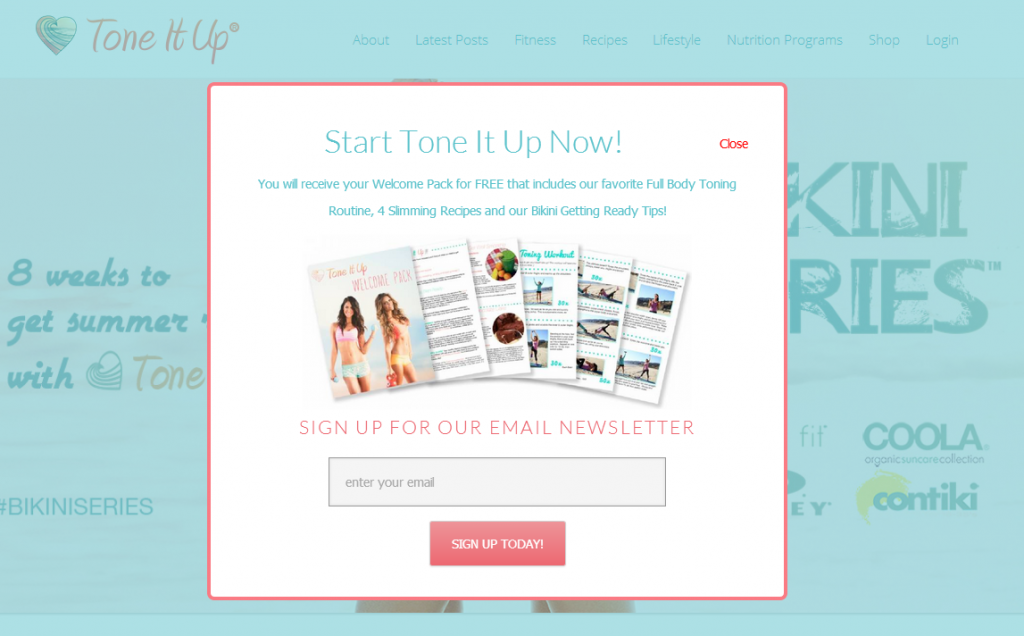
I mentioned above that 40% of consumers enjoy getting emails from brands and particularly ones with specials delivered to their inboxes each week. The opt-in email is catered specifically for the website user who is interested in your products or services but may not be ready to check-out just yet. These emails generally come in the form of pop-ups that tell the customer what they will receive in the email in exchange for their email address. These emails help to place interested consumers on the right path so that when they are ready to make a purchase your email will remind them that your company is the one they want to go with.
2. Abandoned Shopping Cart Email
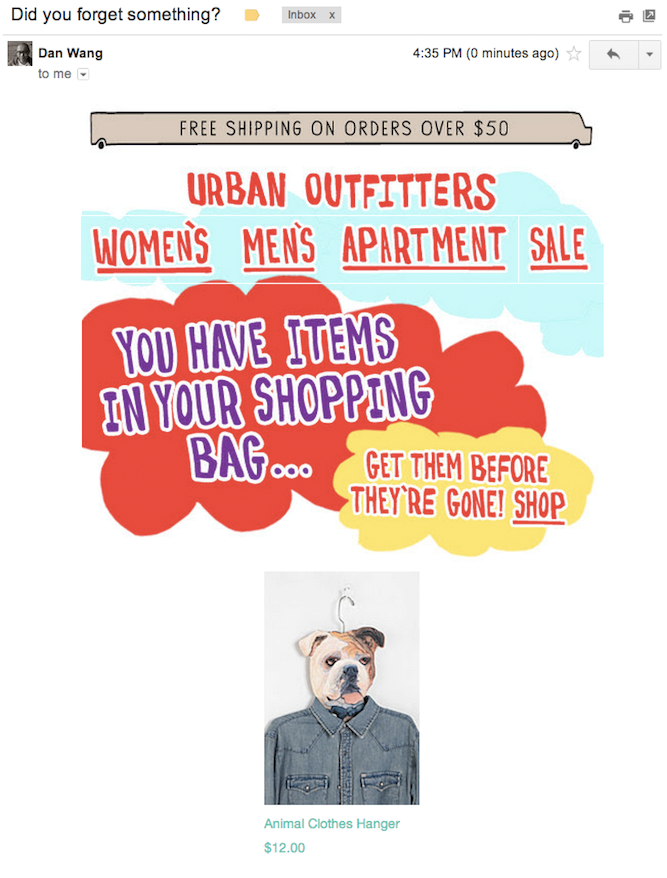
Most of us have clicked-through an online item only to abandon right before we are required to put in our credit card info. Personally, this is a process I have gone through when the shipping and handling costs are unknown. Whatever the reasons we as consumers don’t complete a transaction it presents the eCommerce brand an opportunity to re-engage a potential customer. When a customer makes it right to the point of the checkout and goes incognito brands have information on what that customer is interested in. The ensuing email, appropriately obtained before the credit card processing page to inform the customer the manner in which they will obtain their receipt, addresses the cart abandonment and tries to re-engage the customer with a form of direct response email directly related to the original incomplete purchase.
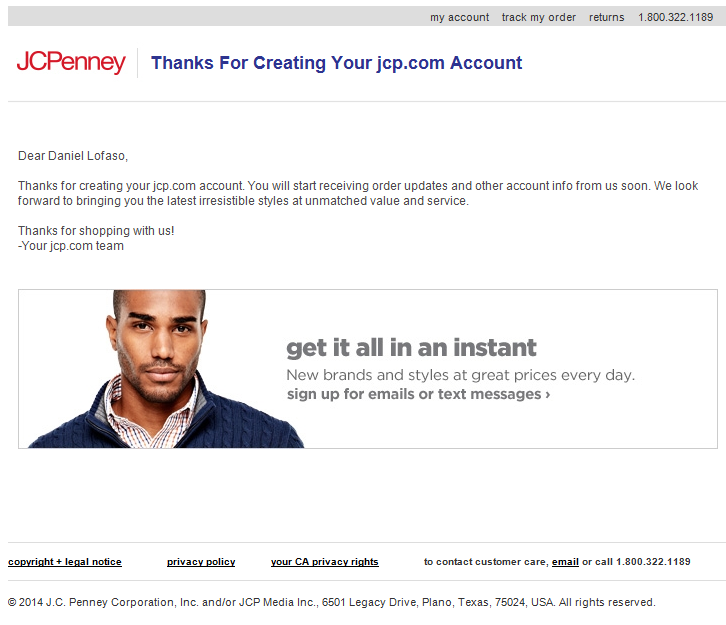
Keep your prospects happy even before they have made a purchase with an account confirmation email. Customers create accounts because they want their purchase and viewing history to be remembered. When customers don’t make purchases from your site yet start an account you can assume that they plan to do so in the future or that they are interested in what you have to offer. Keep this customer in the sales cycle by sending them a confirmation of their account so that they are reminded why they signed up in the first place.
Get Help Setting up Your Email
The aforementioned emails should be implemented automatically into every eCommerce website. Automation software is available to help you streamline these responses so that the appropriate emails go out at the right time and you don’t have to manually send them as the customers enter your sales cycle. For help with the graphic design, text and account setup of automated emails, contact Digital Elevator today.